

The Importance of Correct Sitting Posture
- 09/09/2026
- 0 Comment(s)
Sitting properly might sound simple, but it makes a huge difference to how your body feels at the end of the day.
By ensuring your back is straight and your shoulders are relaxed and aligned, you lay the foundation for a healthy sitting posture, which can significantly improve physical well-being.
How to improve your sitting posture in 6 easy steps
Here’s how to adjust each part of your body to sit more comfortably, starting with the head.
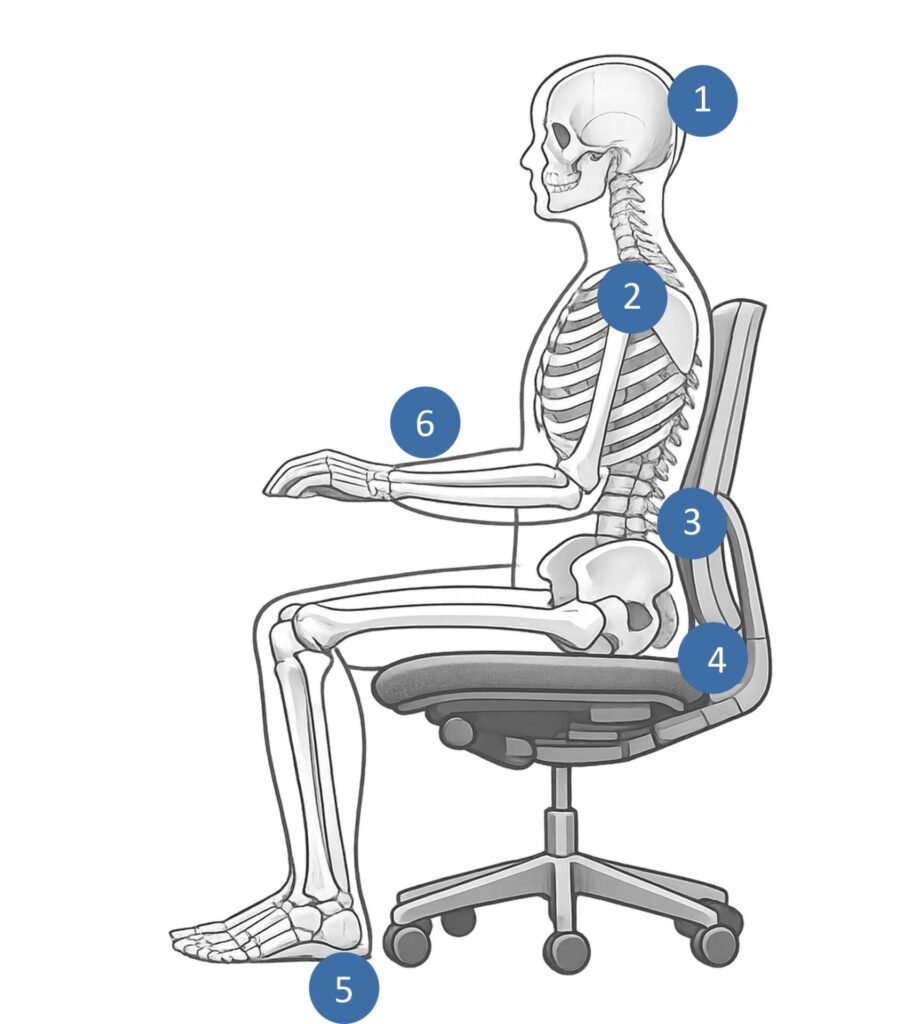
- Head in an upright position – Position your screen so you’re not constantly looking down or twisting your neck. Screens should also be placed at a comfortable viewing distance.
- Shoulders relaxed & aligned – Your shoulders should remain relaxed and not hunched. Your upper arms should stay close to your body without being significantly raised.
- Sit back correctly – Sit back in your chair and make full use of the backrest for support. A good adjustable chair, especially one with lumbar support, can make a noticeable difference.
- Correct body alignment – Try to keep your head, shoulders, and hips stacked in a straight line. Avoid raising your knees above your hips; ideally, they should sit slightly lower, with your thighs angled gently downward.
- Supported feet – Your feet should sit flat on the floor. No dangling or tiptoeing! If your seat height prevents your feet from reaching the floor, use a ergonomic footrest.
- Parallel forearm position – Keep your forearms parallel to the desk and horizontal when typing, with your shoulders relaxed. Adjust the height of your chair or armrests to achieve this. Keep your keyboard and mouse close enough so you are not reaching forward (around a hand’s distance from the desk edge).
Good Posture for Laptop Users
If you use a laptop at your workstation, we recommend you use a separate mouse and keyboard. This enables you to raise the laptop screen using a ergonomic laptop stand so it’s level with the eyes. This should also be positioned about an arm’s length away.
You can also use a separate monitor from your laptop, mounted on a height-adjustable monitor arm.
Protecting your health – Government Guidance
When display screen equipment (DSE) isn’t used or set up correctly, it can lead to pain and/or strain in the neck, shoulders, back, arms, wrists, and hands, as well as fatigue and eye strain. The law covers all types of office environments, including hybrid, home workers, and anywhere with a fixed workstation.
If you are an employer, you have an obligation to provide H&S training and information for DSE users. This training should include good posture when working with DSE. How to correctly adjust chairs and other furniture. Advice on how to arrange desk space, including how to avoid reflections and glare. The importance of breaks and changes to activity, risk assessments, and how to report problems.
There is a wealth of information provided on the HSE website for you to use as guidance. There is also a DSE workstation checklist if users wish to make their own assessment.
- HSE –Display Screen Equipment Workstation Checklist (in compliance with the Health and Safety (Display Screen Equipment) Regulations 1992.
- HSE – Working Safely with display screen equipment
- HSE – Standard workstation setup
How can we help?
At Ergonomic Solutions Direct, we carefully select products from reputable manufacturers and suppliers. All products are also backed by reliable warranties for added peace of mind and long-term continuity.
From office chairs to writing slopes, we offer a full range of ergonomic equipment to help you sit more comfortably.
View our full range of: